
Beats Fit Pro Ear Tips: Sizing, Fit and Replacement Guide
blog.inBrief
How to find the right ear tip size for Beats Fit Pro, why the fit wing matters, and where to get replacements when tips wear out.
Beats Fit Pro Ear Tips: Sizing, Fit and Replacement Guide
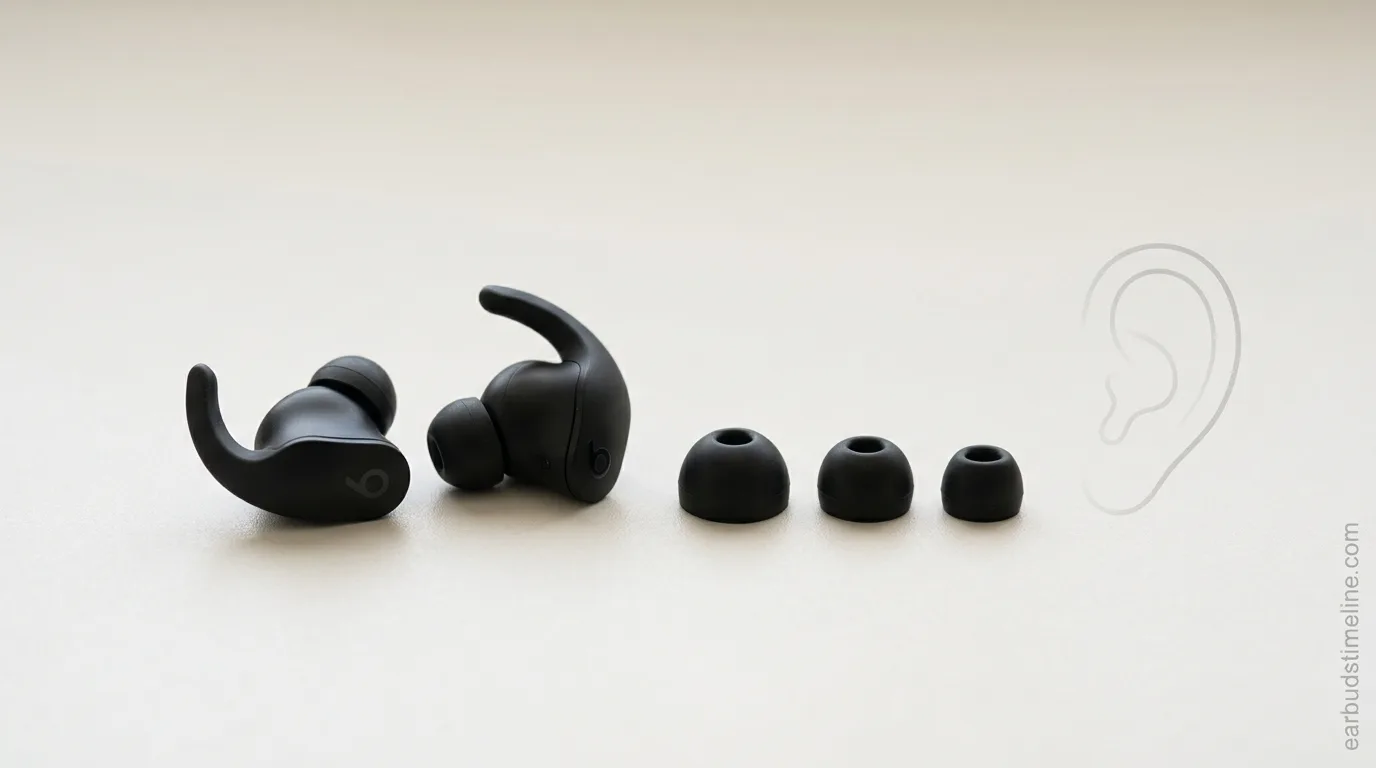
The Beats Fit Pro uses a flexible wingtip design paired with silicone ear tips — getting both right matters more for this model than for most earbuds, since a loose fit affects noise cancelling, bass response and whether the earbuds stay in during movement.
📏 Available tip sizes
Beats Fit Pro ships with three silicone ear tip sizes in the box: Small, Medium (pre-installed) and Large. Most people stay on the pre-installed Medium tip without ever trying the others, which is often why the fit feels "just okay" instead of secure.
✅ How to tell if you have the right size
Seal test: With the earbud in and music paused, gently push it further into your ear. If ambient noise suddenly drops noticeably, you have a proper seal — if nothing changes, the tip is likely too small.
Tug test: Give the earbud a very gentle tug (not hard) while it's seated. It should resist and stay in place; if it slides out easily, size up.
Jaw movement test: Talk, chew, or open your mouth wide while wearing them. If an earbud loosens noticeably, the fit wing size or tip size needs adjusting.
🔄 How to swap ear tips
Grip the silicone tip at its base (not the earbud body) and pull straight off — twisting can help loosen a tight seal.
Align the new tip's opening with the earbud's sound port.
Push it on until it clicks or seats flush against the earbud body.
Re-run the seal test before heading out.
🦻 The fit wing matters as much as the tip
Unlike Beats earbuds that rely on tips alone, Beats Fit Pro adds a flexible wingtip that hooks gently into the upper ear for stability during workouts. If the earbud still feels loose even with the right tip size, the issue is often wing positioning rather than tip size — rotate the earbud slightly until the wing tucks naturally into the ridge of your ear rather than pressing against it.
🛒 Where to get replacement tips
Genuine Apple/Beats replacement tips are the safest bet for a guaranteed fit, sold directly through Apple's online store or Beats' own site.
Third-party silicone tips exist but fit consistency varies — check reviews specifically mentioning Beats Fit Pro compatibility before buying, since generic "universal" tips do not always seat correctly on the Fit Pro's sound port shape.
Contact Beats support if your tips are visibly torn or degraded rather than just an ill fit — a manufacturing defect may be covered.
🔌 Does Beats Fit Pro support wireless charging?
No — the Beats Fit Pro charging case charges via USB-C only; it does not support Qi wireless charging pads. This is a common point of confusion since several other Beats and AirPods models (like AirPods Pro) do support wireless charging, but Beats Fit Pro was released without it. If wireless charging matters to you, double-check the specific model's case before buying rather than assuming all Beats earbuds support it.
🧼 A quick maintenance note
Silicone ear tips accumulate earwax and skin oils over time, which can make a previously good fit start to feel loose or slippery. Rinsing tips with lukewarm water (removed from the earbud, fully dried before reattaching) every few weeks maintains grip and hygiene.
Ear canal shapes vary significantly between individuals — if none of the three included sizes feels secure, it's worth trying third-party tip sets with more size gradations before assuming the earbuds themselves don't fit you.
EarbudsTimeline is an independent project. If this article helped you, a free-amount donation always makes my day.
Stay in the loop
New articles and database updates, no spam.