
blog.tableOfContents
- 1. A charge imbalance between the two earbuds
- How to check
- 2. A dirty charging contact
- How to check
- 3. A Bluetooth pairing link broken on one side
- How to check
- 4. A localized hardware fault
- How to check
- What order should you check these causes in?
- When should you consider a warranty claim?
- Should you reset both earbuds even if only one seems affected?
- Can you buy a single replacement earbud?
- Could the problem come from a third-party app installed on the phone?
- Does an earbud draining faster than the other always mean it's faulty?
- How long does it take for a reset to fix the problem?
blog.inBrief
Battery imbalance, a dirty charging contact, a pairing link broken on one side, a localized hardware fault: the most common reasons why one earbud stops working, and how to tell them apart.
Why Has One Earbud Stopped Working?
One earbud working perfectly while the other stays silent is one of the most common problems with true wireless earbuds.
Unlike a general Bluetooth disconnection that affects the entire pair, a problem limited to one side usually points to a smaller set of possible causes. The good news is that many of them are relatively easy to identify and fix.
Before assuming the earbud is permanently damaged, work through the most common causes in order.
1. A charge imbalance between the two earbuds
The two earbuds in a pair don't always drain their batteries at exactly the same rate.

Depending on the design, one earbud may handle more of the Bluetooth communication or processing, which can cause it to consume slightly more power than the other.
Over time, this difference can become noticeable. One earbud may shut down much earlier than the other, even though both appeared to be fully charged when you took them out of the case.
How to check
If your earbuds have a companion app, check the battery level of each earbud separately.
If one side consistently shows a significantly lower charge immediately after being removed from the case, charging imbalance is a likely explanation.
Put both earbuds back in the case and make sure they are making proper contact with the charging pins. Then allow the pair to fully charge before testing them again.
2. A dirty charging contact

If only one earbud isn't charging properly, the charging contacts should be one of the first things you check.
Dust, debris, earwax residue or oxidation can accumulate on the small metal contacts inside the case or on the earbud itself. Even a thin layer of residue can prevent the earbud from making a reliable electrical connection.
The result can be deceptive: the earbud appears to be sitting correctly in the case, but its battery isn't actually charging.
How to check
Inspect the metal contacts on both the affected earbud and its charging slot.
Gently clean them using a dry cotton swab. If necessary, use a cotton swab lightly dampened with isopropyl alcohol, then allow everything to dry completely before charging.
Avoid flooding the charging contacts with liquid or using excessive force.
Once they're clean, place both earbuds in the case and fully charge the pair.
3. A Bluetooth pairing link has broken on one side

Not every one-earbud problem is related to the battery.
Depending on the design, the earbuds may maintain their own communication link with each other or with the phone. A software or pairing glitch can occasionally affect only one side.
This can produce a particularly confusing situation: one earbud connects and plays normally while the other remains silent, despite having sufficient battery power.
How to check
A full reset is usually the best way to rule out a pairing problem.
Place both earbuds in their charging case, remove the existing Bluetooth pairing from your phone, and follow the manufacturer's reset procedure for your specific model.
After the reset, pair the earbuds again as if they were a new device.
The exact reset procedure varies considerably between manufacturers and models, so don't assume that a generic button combination will work for your particular earbuds.
4. A localized hardware fault

If the earbuds are charged, the contacts are clean and a full reset hasn't solved the problem, a hardware fault becomes increasingly likely.
The problem could involve the driver, amplifier, battery, microphone or another electronic component inside the affected earbud.
Unlike a pairing issue, a hardware fault generally follows the earbud itself rather than the phone it's connected to.
How to check
If possible, connect the earbuds to another phone, tablet or computer.
If the same earbud remains completely silent regardless of the device, and you've already ruled out charging and pairing problems, a localized hardware fault is the most likely explanation.
At that point, repeated resets are unlikely to solve the problem.
What order should you check these causes in?
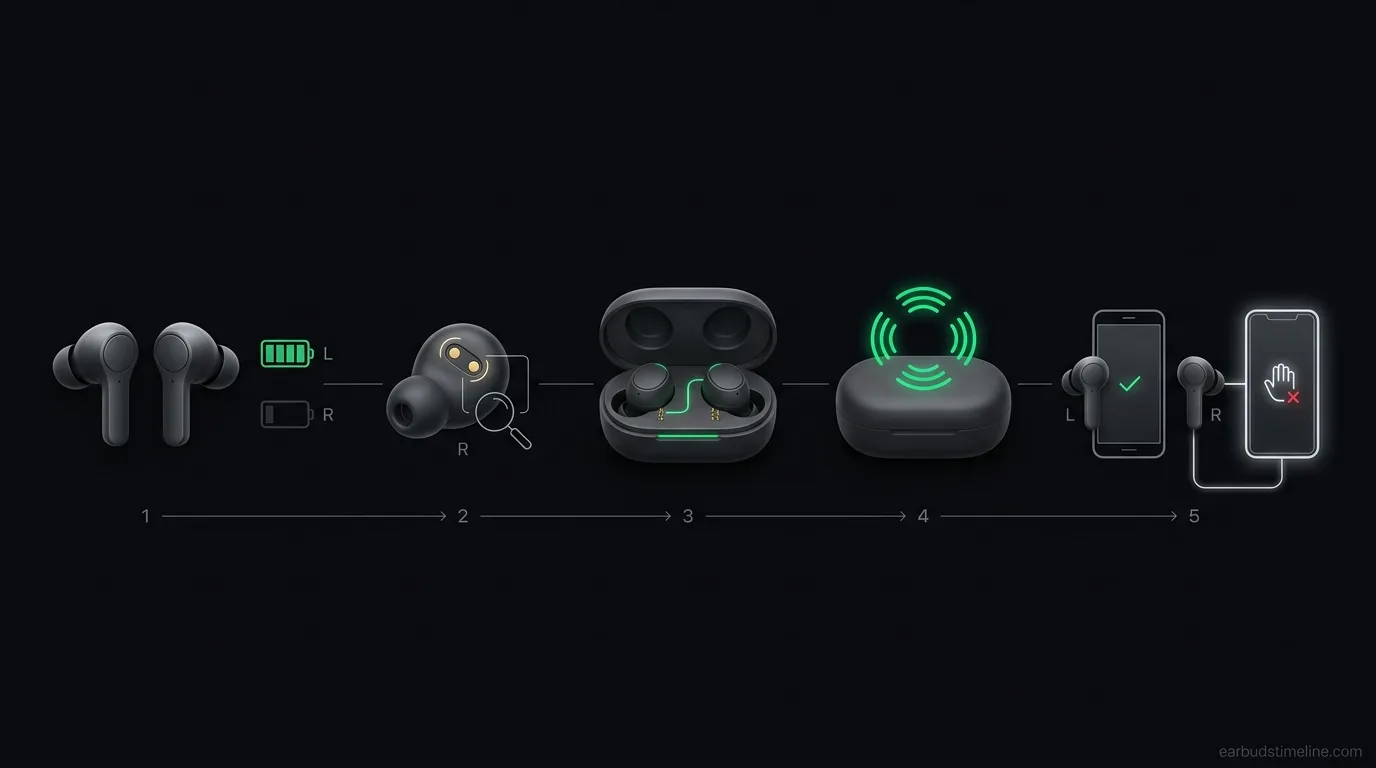
The simplest approach is to eliminate the easiest causes first:
1. Compare the battery level of both earbuds.
2. Check and clean the charging contacts.
3. Fully charge both earbuds.
4. Reset the entire pair and pair them again.
5. Test the silent earbud with another device.
This order matters.
There's little reason to assume that an earbud has suffered permanent damage before you've ruled out a charging-contact problem or a software pairing issue.
## When should you consider a warranty claim?
If the affected earbud remains silent after cleaning the contacts, fully charging the pair and performing a complete reset, it's time to consider hardware failure.
Testing it with another device can provide one final confirmation.
If the same earbud remains silent across multiple devices, the problem is much more likely to be physical rather than related to your phone or Bluetooth settings.
At that point, contacting the manufacturer or making a warranty claim is generally more useful than continuing to troubleshoot.
Keep in mind that warranty coverage and replacement options vary by manufacturer and region.
## FAQ
### Should you reset both earbuds even if only one seems affected?
Yes.
A full reset is generally preferable to resetting only the affected side because it re-establishes the relationship between the two earbuds and the phone.
It also eliminates more potential software and pairing issues in a single step.
### Can you buy a single replacement earbud?
Sometimes.
Some manufacturers sell individual replacement earbuds, while others require you to replace the entire pair. Availability and pricing depend on the brand and model.
Check our article on [warranty and support](/blog/garantie-sav-earbuds) for more information.
### Could the problem come from a third-party app installed on the phone?
It's possible, but relatively uncommon.
If you suspect a software conflict, the simplest way to isolate the problem is to test the earbuds with another device. If the same earbud remains silent there, the phone or its apps are unlikely to be the root cause.
### Does an earbud draining faster than the other always mean it's faulty?
No.
A small difference between the two earbuds can be completely normal. Depending on the design, one side may consume slightly more power because it handles additional communication or processing.
A consistently large or increasingly pronounced difference, however, is worth investigating.
### How long does it take for a reset to fix the problem?
The reset itself usually takes only a few minutes.
If the earbud remains silent immediately after a correct full reset and re-pairing, waiting longer is unlikely to resolve the issue. At that point, focus on testing the hardware and charging behavior instead.
## Conclusion
A single silent earbud doesn't automatically mean it's permanently broken.
The most common explanations are a charging imbalance, dirty charging contacts, a broken pairing connection or a localized hardware fault.
The best approach is to work through those possibilities in order: check the battery, inspect and clean the contacts, fully charge the pair, perform a complete reset, and finally test the earbuds with another device.
In many cases, the problem can be resolved before any repair or replacement is necessary.
Still having trouble? Check our [reset guide by brand](/blog/reinitialiser-ecouteurs-par-marque) before considering a warranty claim.
EarbudsTimeline is an independent project. If this article helped you, a free-amount donation always makes my day.
Stay in the loop
New articles and database updates, no spam.